The Indicator Trap
Most charting platforms ship a clean starting point. TradingView opens with a bare candlestick chart and no indicators. NinjaTrader gives you price and nothing else. The clutter doesn't come from the platform. It comes from you, the moment you open the indicator library and see 100+ options waiting to be added.
The progression is predictable. You add RSI because someone mentioned momentum. Then a moving average for trend direction. Then Bollinger Bands because volatility seems important. But indicators aren't independent opinions. They're all derived from the same price data, run through different math. Stack five on one chart and you get five slightly different interpretations of the same input that frequently contradict each other. That's not analysis. That's analysis paralysis with a technical veneer.
I'm a data-driven trader, which means I feel the pull toward indicators as much as anyone. But everything I was adding was reprocessed price data wearing a different costume. The moment I stripped down to pure price structure, volume profile, and MGI, my chart went from conflicting noise to a story I could read. That shift didn't make trading easier. It made my decisions mine.
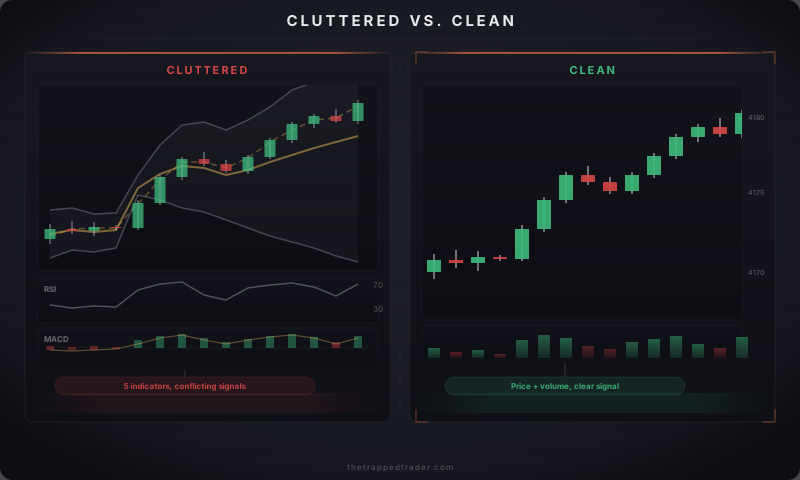
What Belongs on Your Chart
A clean chart keeps what earns its place and removes everything else. Three layers, in priority order:
Layer 1: Candlesticks. Candlesticks show four data points per bar: open, high, low, close. A line chart only plots the close, stripping away wicks, momentum, and the visual patterns from Module 1.2. Candlesticks pack the most readable information into the smallest space.
Layer 2: Volume. Volume tells you whether a price move has participation behind it. A breakout on heavy volume is fundamentally different from a breakout on three contracts.
Layer 3: Key structural price levels. Prior day's high and low, value area high and low, session opening price, and key support/resistance levels from your higher timeframe. These represent where real orders concentrated, not formula output.
Beyond these three layers, the bar for adding anything should be high.
If you add a moving average, you should be able to say exactly why. "The 20-period EMA helps me identify the short-term trend direction so I know whether to look for longs or shorts." That's a specific purpose. "I added it because a trading course said to" is not.
Your Timeframe Pair
Your chart needs two timeframes: one for context and one for execution. The context chart shows you the trend direction and key levels. The execution chart shows you where to enter and exit. You check the context chart before and periodically during the session. You watch the execution chart in real time.
The pair you choose should match how long you actually hold trades. A trader who holds positions for 10-20 minutes needs different timeframes than one who holds for 2 hours.
Common futures day trading pairs:
- Scalping (holding 2-5 minutes): 1-minute execution, 5-minute context
- Standard day trading (holding 10-60 minutes): 5-minute execution, 1-hour context
- Swing-style intraday (holding 1-4 hours): 15-minute execution, 4-hour context
The general principle: timeframes work best when they're roughly 4x to 8x apart. Close enough to inform each other, far enough apart to show genuinely different information. A daily chart and a 1-minute chart are 1,440x apart. They have almost nothing useful to say to each other for real-time decision-making.
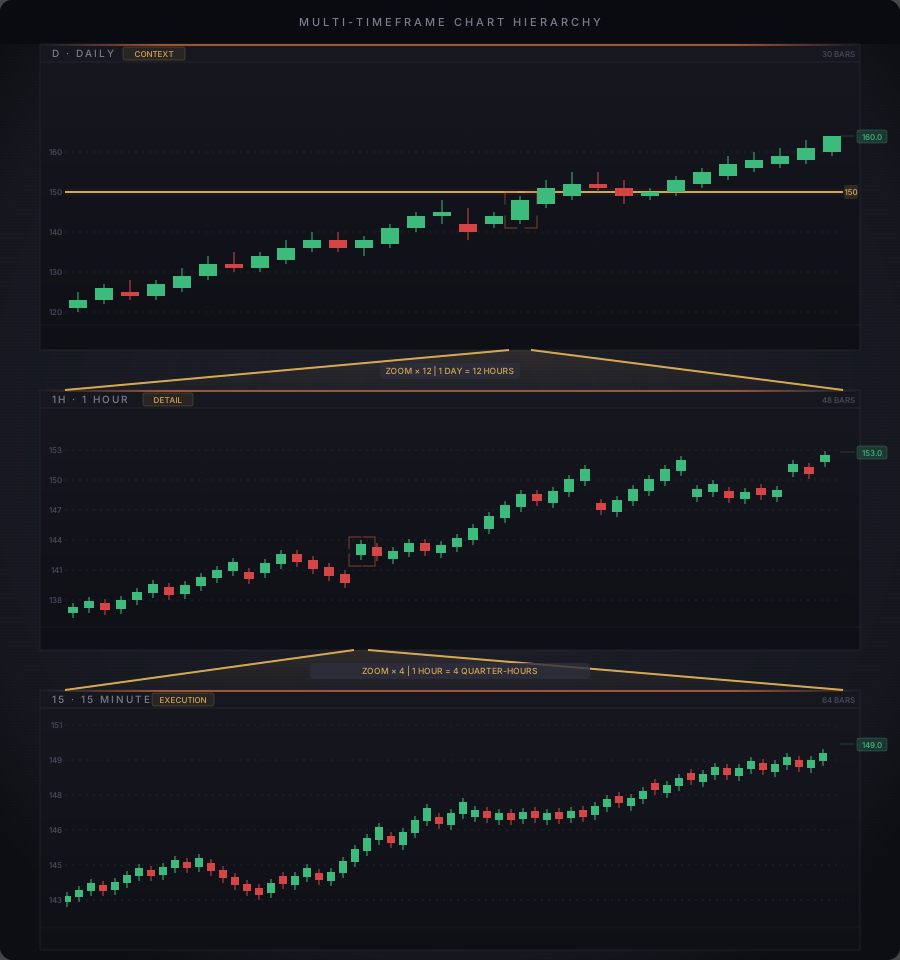
The question: You want to day trade ES futures, holding positions for about 15-30 minutes. What timeframe pair works?
Step 1: Calculate the ratio for common pairings with a 5-minute execution chart.
- 4-Hour / 5-min = 240 / 5 = 48x (way too far apart, context disconnected from execution)
- 1-Hour / 5-min = 60 / 5 = 12x (the standard day trading pair)
- 15-min / 5-min = 15 / 5 = 3x (too close, may show similar noise)
Step 2: Match to holding time. A 15-30 minute hold means your context chart should cover several hold periods. On the 1-hour chart, each candle covers 2-4 of your typical trades. That gives you enough structure to see the trend without drowning in noise.
The takeaway: Start with 5-min / 1-hour. The hourly shows you where the trend is heading and where the key levels sit. The 5-minute shows you when to pull the trigger. If you're scaling up to multi-hour holds, move to 15-min / 4-hour.
Making It Readable
Once you've chosen what your chart displays, make sure you can read it under pressure. Every setting that adds friction is a decision delayed.
- Dark background. Reduces eye strain and produces higher contrast for candle colors. Switch to black or dark gray.
- Session settings (futures). Check whether charts display RTH (regular trading hours only) or full-session data. A level built at 2 AM on twenty contracts carries different weight than one built at 10 AM with full institutional flow. Set to RTH unless your strategy uses overnight levels.
- High-contrast candles. Bright green and red at full saturation. Dark, muted candle colors cause hesitation.
- Kill the grid lines. You read price from axis labels, not grid squares.
- Right-side margin. Leave empty space right of the current candle ("chart shift") so price isn't jammed against the screen edge.
Key Rules
- Start with a blank chart. Add only what you can justify in one sentence.
- Maximum 2 indicators on any chart. If you can't explain the specific decision each one informs, remove it.
- Use 2 timeframes with a 4x-8x ratio between them. Scalping: 1m/5m. Day trading: 5m/1hr.
- Set background to dark and candles to high-contrast green/red. No muted shades.
- Check RTH vs full-session on every futures intraday chart before your first trade.
- Save your chart as a template. Never adjust visual settings during market hours.
The clean chart you just built is the workspace you'll use in the next lesson, where you start paper trading: executing trades in simulation to practice your process without risking real capital.