The Difference Between a Journal and a Trade Log
In Module 1.4, you learned about trading journals as a tool for emotional awareness. A journal captures what you were thinking and feeling. "I was anxious before the entry." "I moved my stop because I couldn't handle the heat." That's valuable work, but it's only half the picture.
A trade log is the other half. It's pure data: what you traded, when, at what price, where your stop was, how much you risked, and what happened. No feelings, no narrative. Just the facts of every trade.
Think of it like a mechanic diagnosing a car. When a customer describes the problem ("it shakes at highway speed, and there's a weird noise when I brake"), those notes capture the experience. That's the journal equivalent. But the mechanic also pulls the OBD-II codes, measures brake pad thickness, checks tire balance readings, and logs the results. Nobody would say "just read the customer's description" or "just look at the diagnostic numbers." You need both, because they answer different questions.
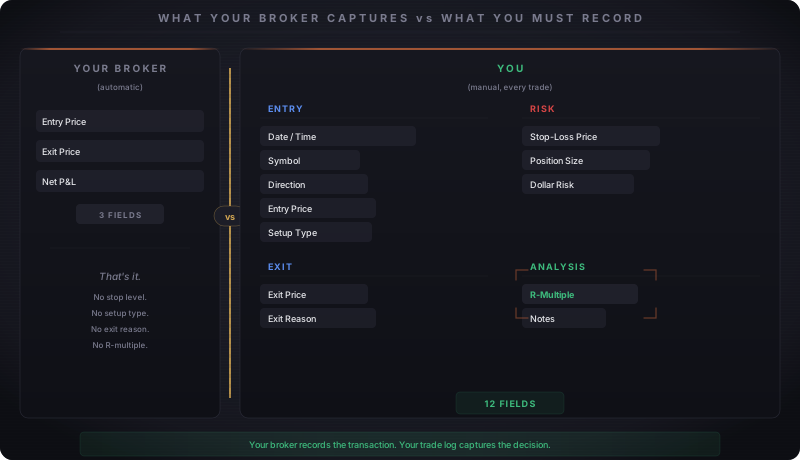
A common mistake is treating your broker's P&L statement as your trade log. It feels like enough because the broker records every transaction. The numbers are real, the timestamps are accurate, and at the end of the day you can see exactly how much you made or lost. The problem is they're the wrong numbers for improvement.
Your broker shows that you made $150 on Tuesday. It doesn't show that you entered 3 ticks late because you hesitated, that your original stop was 2 points away but you widened it mid-trade, or that the setup was a failed breakout pullback. The broker records the transaction. Your trade log captures the decision-making context that produced it.
Building Your Trade Log
Your trade log needs to answer one question about every trade: "If I saw this exact setup again tomorrow, should I take it?"
To answer that, you need specific fields.
Entry data: Date and time, symbol (ES, NQ, MES, etc.), direction (long or short), entry price, setup type (breakout, pullback, reversal, etc.)
Risk data: Stop-loss price, position size (number of contracts), dollar risk (the amount you lose if stopped out)
Exit data: Exit price, exit reason (target hit, stopped out, manual exit, time stop)
Analysis fields: R-multiple (how many R you made or lost), notes (anything unusual: news event, low volume, wider than normal spread)
You don't need expensive software. A spreadsheet works. A notebook works. The tool matters less than consistency. Pick a format you'll actually fill out after every trade, because a trade log is only useful if it has data in it.
The Screenshot Habit
Numbers tell you what happened. Screenshots show you what it looked like.
Take two screenshots for every trade:
Before entry: Capture the chart the moment before you click the button. This is the setup as you saw it in real time, not reconstructed later from memory. Your brain is excellent at rewriting history to make past decisions seem more reasonable than they were. A screenshot taken at the moment of decision is evidence your memory can't edit.
After exit: Capture the chart after the trade closes. Now you can see what actually happened. Did price come within a tick of your target before reversing? Did your setup play out perfectly but you exited early? Did the trade move against you immediately, suggesting your entry timing was off?
Organization matters. Create a folder structure by date (2026-03/2026-03-21/) or by setup type (breakouts/, pullbacks/). File names should include the date, symbol, and direction: 2026-03-21-ES-long-breakout.png. When you do your weekly review, you'll search through dozens of these. A clear naming convention saves you from a chaotic folder of Screenshot_1247.png files that tell you nothing.
The whole process takes about 30 seconds per trade. Two keyboard shortcuts, a file rename, done. That 30 seconds gives your future self the visual context that no spreadsheet column can capture.
The Metrics That Matter
Once your trade log has 20 or more trades, you have enough data to calculate meaningful metrics. Before that, the sample size is too small to draw conclusions.
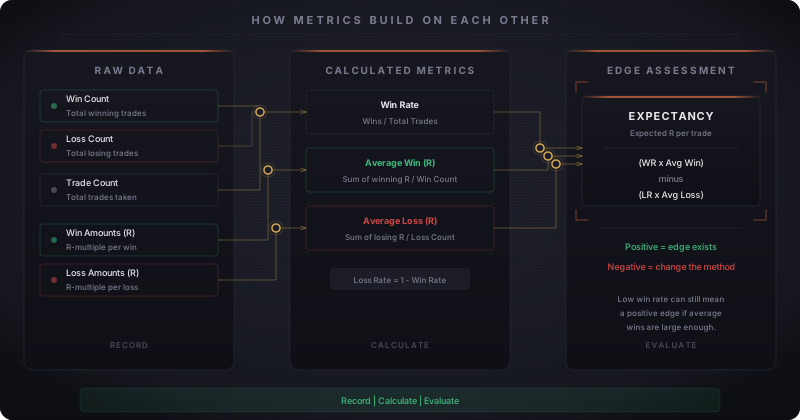
Win rate is the first metric traders gravitate toward, and often the only one they track. "6 out of 10 = 60%." That feels encouraging. But win rate alone tells you almost nothing about whether your trading is profitable.
A trader with a 40% win rate who averages 3R on winners and 1R on losers makes more money than a trader with a 70% win rate who averages 0.5R on winners and 2R on losers. The first trader wins less often but wins big when right. The second trader wins constantly but gives it all back on a few bad losses. Win rate without context is a vanity metric.
The number that tells you whether your trading actually works is expectancy.
12 winners, 8 losers
Win rate = 12/20 = 60% (Loss rate = 40%)
Total R from winners: +1.5, +2.0, +1.0, +1.8, +0.5, +2.5, +1.2, +1.0, +3.0, +0.8, +1.5, +2.2 = +19.0R
Average win = 19.0 / 12 = +1.58R
Total R from losers: -1.0, -1.0, -0.8, -1.0, -1.5, -1.0, -1.0, -0.7 = -8.0R
Average loss = 8.0 / 8 = -1.00R
Expectancy = (0.60 x 1.58) - (0.40 x 1.00)
Expectancy = 0.948 - 0.400 = +0.548R
Your expectancy is +0.55R per trade. Over 100 trades, you'd expect to make roughly 55R. If your standard risk is $100 per trade, that's $5,500 of expected profit over 100 trades, assuming you execute your system consistently.
Now change one variable. Same 20 trades, but suppose your average loss jumps from 1.0R to 1.5R because you kept widening stops:
Expectancy = (0.60 x 1.58) - (0.40 x 1.50) = 0.948 - 0.600 = +0.35R
Your Review Schedule
Collecting data is step one. Reviewing it is where improvement happens. Without a schedule, your trade log becomes an archive you never open. This is where the trade log and the journal from Module 1.4 work together: during your weekly review, the log tells you what happened (you exited early on 4 out of 8 trades) and the journal tells you why (you were anxious after Tuesday's loss and started flinching at every pullback). Data from the log plus emotions from the journal equals the complete picture. One without the other leaves you guessing.
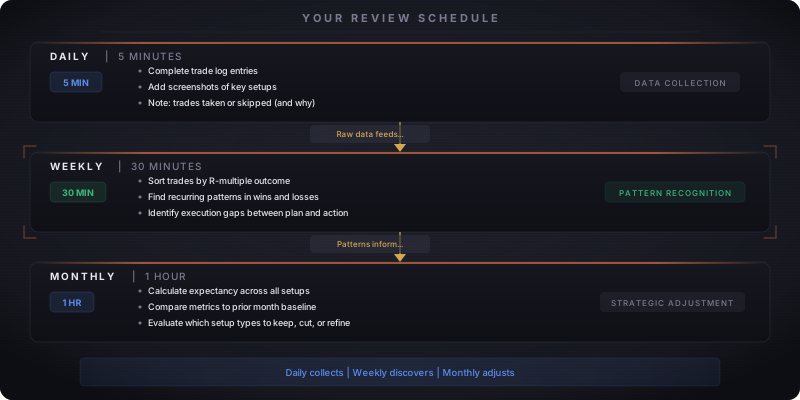
Daily (5 minutes, end of session): Complete your trade log entries while the trades are fresh. Fill in every field. Add your screenshots. If you took no trades, note that too, along with whether you skipped valid setups or whether nothing met your criteria. Both of those answers tell you something.
Weekly (30 minutes, same day each week): This is the session that matters. Pull up the week's trades and look for patterns.
Monthly (1 hour, end of month): Zoom out. Calculate your monthly expectancy, win rate, and average R. Compare to the previous month. Are you improving, flat, or declining? Look at which setup types produce positive expectancy and which don't. If breakout trades have negative expectancy over 30 samples but pullback trades are strongly positive, that's a data-driven signal to stop taking breakouts, at least until you figure out what's going wrong.
What does "compare to the previous month" look like in practice? Put last month's numbers next to this month's in a simple table: expectancy, win rate, average win R, average loss R, total trades, and protocol compliance (if you track it). Look for trends, not single-month spikes.
A win rate that dropped from 55% to 48% is noise. A win rate that dropped from 55% to 48% to 41% over three months is a signal. Same with average loss. If your average loss crept from 0.9R to 1.1R to 1.4R, your stop discipline is eroding and no amount of winner optimization will fix it.
Once you have your own data, you stop needing anyone else's highlight reel to measure progress. Your trade log is the honest mirror that social media will never be. Now that you've built the infrastructure to track your trading, the next lesson covers choosing your learning path: which instruments and strategies fit your goals, and what the next phase of your development looks like.