What a Trading Platform Actually Does
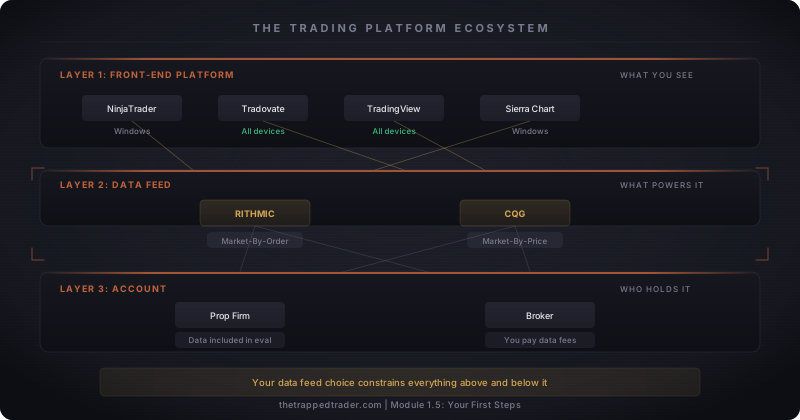
Most beginners picture a trading platform as one app: download it, log in, trade. In reality, a platform handles three separate jobs, and confusing them leads to bad purchase decisions.
Charting is what you see: candlesticks, drawing tools, indicators. This is where you read the market and identify setups.
Order execution is what you do: placing trades, setting stop losses, managing open positions. The order types you learned in Module 1.1 (market orders, limit orders, stops) are all executed through this layer. When you're in a live trade, every extra click between you and the market is a liability.
Data feeds are what power everything: the raw stream of price and volume data from the exchange to your screen. Without a data feed, your charts are blank and your orders can't execute.
Think of it like a car. Charting is your windshield and mirrors: how you see the road. Order execution is the steering wheel and pedals: how you control the car. The data feed is the engine: you never look at it directly, but nothing moves without it.
In futures trading, these three jobs are often handled by three separate companies. Your charting software might be NinjaTrader, your data feed might come through Rithmic, and your account might be held at a prop firm like Apex. They're connected, but they're separate products with separate compatibility requirements.
The one-product mental model forms because trading apps look like one thing: you download software, you see charts, you click buttons. The interface hides the layers underneath. But the moment you try to connect NinjaTrader to a CQG data feed, or run a Rithmic-based evaluation on a Mac, the seams show. The layers are separate, the compatibility rules are real, and discovering the mismatch after you've already paid is how evaluation fees disappear before a single trade.
Think of it like a phone on a carrier network. Your hardware (iPhone), your carrier (Verizon), and your apps (Instagram, broker app) are three separate layers. You can switch carriers without changing your apps. But a phone locked to AT&T won't work on Verizon: compatibility runs in one direction. Platform ecosystems work the same way. A NinjaTrader license can connect to Rithmic or CQG. But a prop firm that only provides Rithmic credentials can't be accessed from Tradovate, which only speaks CQG. The lock runs between layers, not within them.
Rithmic drops more often than people expect, and I've been on the wrong side of it mid-trade. The flatten button in NinjaTrader stopped responding, the position was still open, and nothing I clicked made a difference. What I didn't know at the time: the platform layer can't send orders if the data feed layer is already gone. The fix wasn't in NinjaTrader at all, it was in the broker's order management portal. Two separate layers, two separate places to close a position.
Platform, Data Feed, Account: Three Layers, Not One Product
Understanding the three-layer ecosystem isn't academic. It determines what you can use, what it costs, and what happens when you switch firms.
Layer 1: The front-end platform. This is the software on your screen where you look at charts, click buttons, and manage trades. NinjaTrader, Tradovate, TradingView, Sierra Chart. You can often switch front-ends without changing anything else in your setup.
Layer 2: The data feed provider. This is the pipeline that streams live price data from the exchange to your platform. For futures, two providers dominate: Rithmic and CQG. Your data feed choice determines which platforms you can connect and which prop firms are compatible.
Layer 3: Your account. This is your broker (if self-funded) or your prop firm. They hold the money, handle clearing, and set the rules. When you sign up for a prop firm evaluation, the firm provides your data feed credentials. You plug those credentials into your front-end platform, and you're connected.
Walk through a real example. You purchase a prop firm evaluation. The firm emails you Rithmic login credentials. You open NinjaTrader, enter those credentials in the connection settings, and your charts fill with live market data. If your platform can't connect to the firm's data feed, you can't trade. Period.
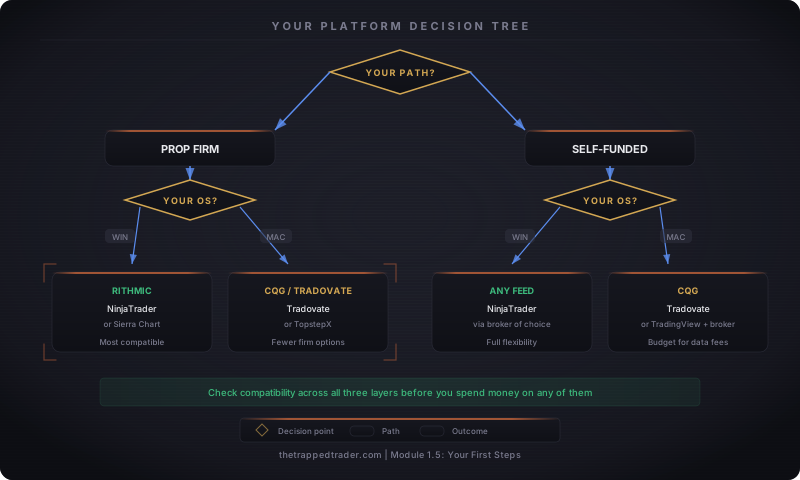
The OS constraint. Rithmic only runs on Windows. If you're on a Mac and you purchase a Rithmic-based prop firm evaluation, you'll need a Windows virtual machine or a cloud VPS to connect. That's an extra $20-40/month and added complexity. Check this before you pay for anything.
The Platforms and Data Feeds You'll Choose Between
You don't need to evaluate fifty options. Four front-end platforms and two data feeds cover the vast majority of futures traders.
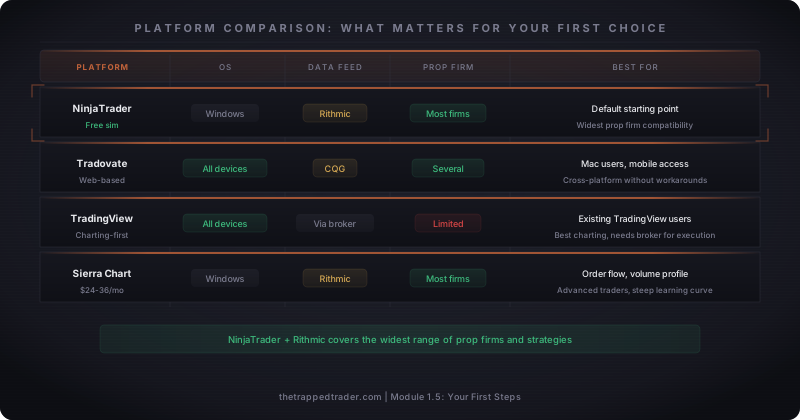
NinjaTrader is the default starting point. Free unlimited sim trading with no deposit required. Compatible with Rithmic, which most prop firms use. The free tier has higher per-trade commissions, but that doesn't matter until you're trading live with your own money. Windows-only.
Tradovate runs in a web browser and works on Mac, Windows, and mobile. Uses CQG for its data feed. Now owned by the same parent company as NinjaTrader. If you need cross-device access or you're on a Mac, this is the natural starting point.
TradingView has the strongest charting interface of the group, but it isn't a standalone execution platform for futures. You need a broker connection (AMP Futures, Optimus, or others) for live order execution. Some prop firms now integrate TradingView as a charting layer. If you already know TradingView from stocks or crypto, this can ease the transition to futures.
Sierra Chart is built for serious order flow and volume profile traders. Extremely fast, extremely stable, extremely steep learning curve. Runs $26-46/month depending on the tier. Not where beginners should start, but worth knowing it exists for later.
For data feeds: Rithmic delivers Market-By-Order data, meaning you can see individual orders in the book. Preferred by scalpers and tape readers. CQG delivers Market-By-Price data (aggregated by level), which is simpler and powers Tradovate. For a beginner learning price action, either works fine. The difference matters when you advance into order flow strategies.
How Your Trading Path Shapes the Choice
Your platform decision starts with one question: are you evaluating with a prop firm, or funding your own account?
The prop firm path. When you buy a prop firm evaluation, the firm dictates your data feed. Apex Trader Funding offers Rithmic or Tradovate (you choose at purchase, and it's locked). Topstep now requires their proprietary TopstepX platform for all new evaluations. TakeProfitTrader offers Rithmic or CQG, also locked at purchase. Your choice constrains which front-end platforms you can connect.
Most evaluation fees include market data, so you won't pay separate exchange data fees during the evaluation or the sim-funded stage. Once a firm moves you from sim funding to a live funded account, that changes. The costs vary significantly by firm. Budget for post-funding data fees before you get there so they don't eat your first payout.
The practical advice: learn one platform well before you start paying for evaluations. NinjaTrader's free sim gives you unlimited practice with zero cost. Use it until the software disappears and you're thinking about the market, not the buttons.
The self-funded path. More flexibility, more cost responsibility. Your broker choice determines commissions, margins, and available data feeds. Platform cost, data feed fees, and CME exchange fees are all separate line items. Budget $2-41/month for CME market data alone (non-professional rates), on top of whatever the platform charges.
What It Actually Costs
Platform costs surprise people because the total changes dramatically depending on where you are in the journey. Two numbers matter right now.
Prop firm evaluation path: Your evaluation fee ($50-200+ depending on the firm and account size) typically bundles market data. Your front-end platform is often free: NinjaTrader's free tier and Tradovate's web app both cost nothing until you're trading live capital. Total recurring cost while evaluating: often $0 beyond the evaluation fee itself.
Self-funded path: You carry the full stack immediately. Rithmic connection fee (~$25/month, broker-dependent), CME exchange data ($2-41/month depending on Level 1 vs full bundle with depth), and platform license if applicable ($0-99/month). A typical NinjaTrader free tier + Rithmic + CME Level 1 setup runs roughly $27/month before per-trade commissions.
The number that surprises prop traders comes later: when a firm moves you from sim funding to a live funded account, the cost structure changes. Firms handle this differently. Apex charges a flat $85/month PA fee covering data and platform access. Topstep classifies funded traders as professional-tier market data subscribers, which changes the exchange fee structure significantly. Each firm publishes their live funded account fee schedule. Read it before you start your evaluation, not after you pass it.
Platform Skills to Lock In Before You Pay for Anything
Choosing the right platform combination is half the job. The other half is making sure the software disappears when you're trading. Every second spent hunting for a button during a live evaluation is a second you're not reading the market.
Picture a trader on day four of a timed evaluation: a setup forms, they go to place a bracket order, they click the wrong button, submit a market order instead, the position fills without a stop attached. They scramble to find the flatten button, click through two menus, and exit late. Then they try to drag the stop and accidentally close the position instead. Their chart layout looks nothing like what they practiced on because they never saved a template. That's not a market problem. That's an interface problem, and every one of those failures had a specific fix. Here's what to automate in sim before the evaluation clock starts.
Place a bracket order in under 3 seconds. This is the failure in the scenario above. A bracket order is an entry with a stop loss and profit target attached as a single unit. When the entry fills, the stop and target are live immediately, with no manual intervention. Every serious futures platform supports brackets. Find the setting, configure your default sizes, and drill it until the sequence is muscle memory.
Flatten all positions with one click. This is the second failure in the scenario: two menus to get out when the market is moving. Every platform has a "flatten" or "close all" button that exits everything instantly. On NinjaTrader, it's the "Close" button on the Chart Trader panel. On Tradovate, it's the flatten icon on the DOM. Locate it today. It should be the button you could find in the dark.
Switch between sim and live without confusion. The trader in the scenario was on a live evaluation, but the habit of verifying the mode matters every single session. Accidentally placing a live trade in a sim session (or a sim trade in a live session) has ended evaluations. Most platforms use color coding: NinjaTrader shows a green bar for sim, no bar for live. Verify mode before you place the first order of the day, every day.
Set up chart templates that load instantly. The cluttered chart in the scenario came from not saving a workspace. Configure your layout once: timeframes, indicators, colors, DOM placement. Save it. When the platform opens, everything should appear exactly as you left it. Rebuilding at 9:25 AM costs setups.
Modify a stop loss while a trade is running. Know at least two methods: dragging on the chart, typing a new price into the DOM, and using a keyboard shortcut if your platform supports it. If one method lags during a volatile move, you need a fallback. Practice adjusting stops on sim trades until the operation feels mechanical.
Now that you understand how the platform ecosystem works, the next lesson covers setting up your charts. Because even the right platform works against you if your chart layout creates clutter instead of clarity.